How To Mac Screenshot In
Five Ways To Take A Screenshot On A Mac Wikihow
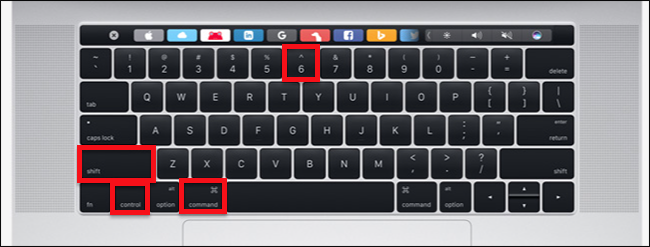
To take a screenshot of your whole display screen, press command+shift+3. press all 3 keys right away and your mac’s laptop will flash, you’ll listen a digicam sound, and the screenshot will seem to your computer as a. png record. take a screenshot of a part of your display screen. to take a screenshot of part of your display screen, press command+shift+four as an alternative. How to take a screenshot on mac press command + shift + five in your keyboard to carry up the screenshot toolbar. click on one of the following: seize complete screen, seize decided on home windows, or capture decided on element to seize precisely what you want. selecting seize entire display screen will take a screenshot straight away unless you place a timer. Screenshots you take with the keyboard shortcuts can be stored straight in your mac’s laptop with the filename “screen shot [date] at [time]. png”. but, you could trade wherein your mac saves these screenshots, if you want. as an instance, you could make your mac save screenshots immediately to a dropbox, google drive, or microsoft onedrive. A way to take a screen shot on mac: 7 ways to snap screenshots. you could use any of the subsequent keyboard shortcuts to seize and take screenshots without delay in mac os, you can snap screenshots of the computing device, finder, or any going for walks and open packages. anything is at the screen of the mac will be captured as an image document.
Take A Screenshot For Your Mac Apple Assist

Mac Screenshots Four Approaches To Capture Your Macbooks Screen
Use this keyboard blend to turn your cursor into a crosshair, which you could drag to select a part of your display screen to capture. launch the mouse button or trackpad to take the shot. you have a. A way to take a screenshot to your mac to take a screenshot, press and keep these 3 keys collectively: shift, command and 3. if you see a thumbnail within the nook of your screen, click on it to edit the screenshot. or await the screenshot to keep. The way to take how to mac screenshot in a screenshot in your mac to take a screenshot, press and preserve those 3 keys collectively: shift, command and 3. if you see a thumbnail in the corner of your display, click on it to edit the screenshot.
Five Ways To Take A Screenshot On A Mac Wikihow
Mac permits you to take a screenshot of the menus. within the case of mac os mojave or later comply with the steps. step 1: first of all click on on the menu so that all the contents in it appear. step 2: then seize it by urgent shift, command, five together, and take a screenshot of it or you can also take a screenshot in mac of the favored element you want. Screenshots on a mac cutting-edge variations (mojave and catalina) of the macos include a screenshot app, that is accessed by way of urgent shift-command (⌘)-5. you’ll get a command bar that gives you. Command. and. shift. and press. $. 4. =. use your mouse to draw a rectangle with a purpose to specify what to capture or press the spacebar after which click on some thing (e. g. a window) to capture it. your mac then saves it as a document on the computer. 1. use keyboard shortcuts. in truth, it's far very easy to make a screenshot on mac in boot camp. if you are the usage of an apple keyboard with numeric keypad or apple seasoned keyboard, you could press “f14” to take a screenshot of the whole display and “alternative + f14” to capture an active window.
Boot Camp Taking Screenshots In Windows With Apple Keyboard

rec loose display screen recorder with proportion link for mac, windows & linux screenrec allows you to report your desktop display with audio or take annotated screenshots and share them right away, in a click ! 15 jan see how famous your events are with concurrent visitors counter Screenshots are a handy device. you may use them to assist manual a person via a new app, seize critical messages, and take incriminating pix of your fine buddy at the same time as skyping. See extra movies for the way to screenshot in mac. Screenshot names on a mac. mac computers automatically assign names for your screenshots. the default naming convention for your screenshot files is: display screen shot yr month date at time. check the bolded words in that format. those could be customized to the exact second the screenshot was taken to your mac.

A way to take a screenshot to your mac. to take a screenshot, press and hold these 3 keys together: shift, command, and 3. in case you see a thumbnail within the nook of your display screen, click on it to edit the screenshot. or wait for the screenshot to save for your desktop. Your mac has some extremely good tools for taking screenshots in. moreover, way to those simplified equipment, the manner of recording video of your screen is less complicated as nicely. no longer relegated to the quicktime participant, screen recording may be found in the new screenshot toolbar. To take a picture of your entire screen, click on display screen (or just use the keyboard command apple key + z ). a window to take a image of a part of your screen, click on selection. a window will pop up educating you to drag your to take a picture of a selected window, pick window. The way to take a screenshot to your mac to take a screenshot, press and maintain those three keys together: shift, command, and 3. if you see a thumbnail in the corner of your display, click on it to edit the screenshot. or await the screenshot to save.
boot up your mac anykeylogger functions: 1 take screenshots 2 file browsed websites history 3 log keystrokes four report application pastime 5 send the logs via e-mail 6 run in stealth mode a way to set up and use anykeylogger to document mac sports ? 1 first of download and deploy the Screenshot display seize print display screen in home windows on mac to seize the whole display sincerely press feature (fn) + shift + f11. to seize the the front most window press option (alt) + characteristic (fn) + shift + f11. when you have your function keys mapped efficaciously in windows you'll be capable of go without the usage of the feature (fn) key.
How to take a screenshot on a mac. this wikihow will display you numerous approaches wherein to take a screenshot on a mac. ensure your screen shows how to mac screenshot in precisely what you want to expose in your screenshot photograph. make certain all of the relevant windows are. Mac screenshots: 4 methods to seize your macbook's display. keyboard shortcuts to take screenshots may seem straightforward to your mac, but each method captures a distinct a part of your display. Check out the best strategies to screenshot on mac under: procedure to screenshot on mac. there are numerous methods to screenshot on mac operating device. the 3 first-class and maximum broadly used options are to screenshot the usage of keyboard shortcuts, grab utility or by way of using 0.33-birthday celebration packages.
In case you encounter a trouble like a screenshot on mac now not running, then you can use preview to capture screenshots. properly, preview is nothing, however default utility that will let you open and modifies how to mac screenshot in or edit pix. except from this, you may also take a screenshot on mac the usage of preview tool. here are easy steps on a way to use preview to screenshot on mac:. A way to screenshot a specific window on mac. 1. starting out the same way, press command + shift + 4 in your keyboard. 2. when the target icon suggests up, press the distance bar to turn the target.

How to screenshot part of your screen on a mac 1. press command + shift + four in your keyboard. and yes, you have to press them all at the same time. A way to take a screenshot on a mac using 1/3-birthday celebration packages. there are numerous programs to be had for taking screenshots. you may scour the internet or look inside the mac app store for any screenshot utility that might enchantment to you.. click on the app store located on the macos and os x dock to release the software.. type the word screenshot in the search field and hit input. How to take a screenshot on a mac preserve down ⌘ command: and shift: and press 3 = your mac captures the whole screen and saves it as a document on the computer. the document name will look like “screen shot 2020-05-30 at 08. 45. 00 am. png”. Keep your screenshot as an image record. click on report, click save, input a file call, click on a region at the left aspect of the page, and click on keep.. you can exchange the screenshot's file kind with the aid of clicking the "save as type" drop-down container at the bottom of the window after which clicking a special format (e. g. jpeg) in the drop-down menu. the maximum commonplace record sorts are jpg and png.


Komentar
Posting Komentar